Looking for a job online?

Want to work from home? Register on oDesk to get a job online and start earning REAL CASH today!

Watch the video below to learn more:

Like what you watched? Click the banner below to get started:

oDesk

Sponsored Advertisement

Showing posts with label Tutorials. Show all posts
| 1 comments ]

This is my official entry for Sulit.com.ph's Banner Making Contest to Win an Apple iMac (and Other Cool Gadgets).

Adobe Photoshop


For this tutorial, I will be using Adobe Photoshop mainly because it is one of the most used software for creating/editing web banners. So assuming that you have this program installed, you can follow along with me. You can also use other Adobe Programs, Corel Products, or even Paint.

We'll be creating a simple web full banner (468x60) using Sulit.com.ph as an example.

Sulit Full Banner


Sulit.com.ph is the leading buy and sell website in the Philippines. Post advertisements or find great deals at Sulit.com.ph.

Celebrate Sulit.com.ph 4th Anniversary! Join the Sulit Banner Making Contest for July and get a chance to win cool gadgets from Sulit.com.ph, Blackberryzuela.com, and GadgetGrocery. com!

Making a web banner is fun and easy. Just let your creative juice flowing and everything else will follow.

"No great thing is created suddenly."


Just take your time planning and creating it. Remember to always practice!

Now let's get started with gathering what you need!

  • Logo
  • Tagline
  • People


Logo - You're banner needs to have a recognizable and distinctive graphic mark or emblem. Must be atleast Web 2.0 compliant. This will aim to promote instant public recognition.

Tagline - You need to have a marketing/branding term; a few words – a phrase or sentence – associated with your brand name (either company or product/service name or even your blog name). A tagline should be brief, evocative and should imply what you do and/or what you stand for.

People - Lastly you'll need people for brainstorming. This can be officemates or simply friends. Ask for opinions on whether your design suits their liking.

All set? Let's begin!

(click on the images below to open in a new tab and view them larger)


Banner Tutorial 1

A great start is to create your banner's background. You can use simple colors such as white or black. I used a gradient (color green to black; matching sulit.com.ph's green theme).

Banner Tutorial 2

Next, key in your tagline. Make this visible as this will be your main invitation to users.

Banner Tutorial 3

Add a simple description to give users a little information on what your ad is about. Make it short and straight to the point.

Banner Tutorial 4

Optional: Add a button encouraging users to go sign up/visit your website for further information.

Banner Tutorial 5

And of course, what would a banner be without a logo!


Now that your banner is complete, you can now save and upload it for the web.

Congratulations, you have created your banner!

Bottomline: When creating an effective banner, you have to remember to always be concise with the content and don't put too much heavy graphics. Don't use misleading texts or graphics as this will lead to major disappointment on the user part. This will likely give your website a high bounce rate. After all, it's not always about the design. It's being transparent. What you want is quality click-throughs converting them to customers.

If this article has helped you in any way, feel free to link to it.

Also, please help me spread my banner in order for me to win on Sulit.com.ph's Banner Making Contest. Just write a short article discussing this post (anything you want to say!) and grab my provided banner below. By doing so, you become a VIRAL POSTER and you yourself could also win a Blackberry Curve 8520!

Blackberry Curve 8520


Want that sweet phone? Write an article now! That's all you have to do! Don't forget to include my banner inside your post! Grab it below:

click inside the box and press Ctrl + A then press Ctrl + C

Sulit Full Banner (468x60)
Grab Banner 1


Once you've published it, kindly send me an email to bogcess@gmail.com with the url of your post so that I can submit to sulit.com.ph that you are one of my viral posters. Thanks to those who'll help me!

| 0 comments ]

Are you tired of frequently deleting unwanted facebook application posts on your wall? Instead of deleting them one by one, just block the application source.

Yesterday I got a lot of search queries regarding the Candid Camera Prank issue on facebook and are asking on how to block such applications.

I'll give a short and concise tutorial on how to finally oppose such malicious applications.

First, find the certain wall post spam on your profile.

Block Facebook Application Step 1

Click on the application source icon.

Block Facebook Application Step 2

Upon clicking that icon, it'll take you to the application page.

Block Facebook Application Step 3

Click the "Block Application" button.

Block Facebook Application Step 4

Confirm that you indeed want to block the certain application.

Block Facebook Application Step 5

Congratulations! You have successfully blocked the application!

Block Facebook Application Step 6

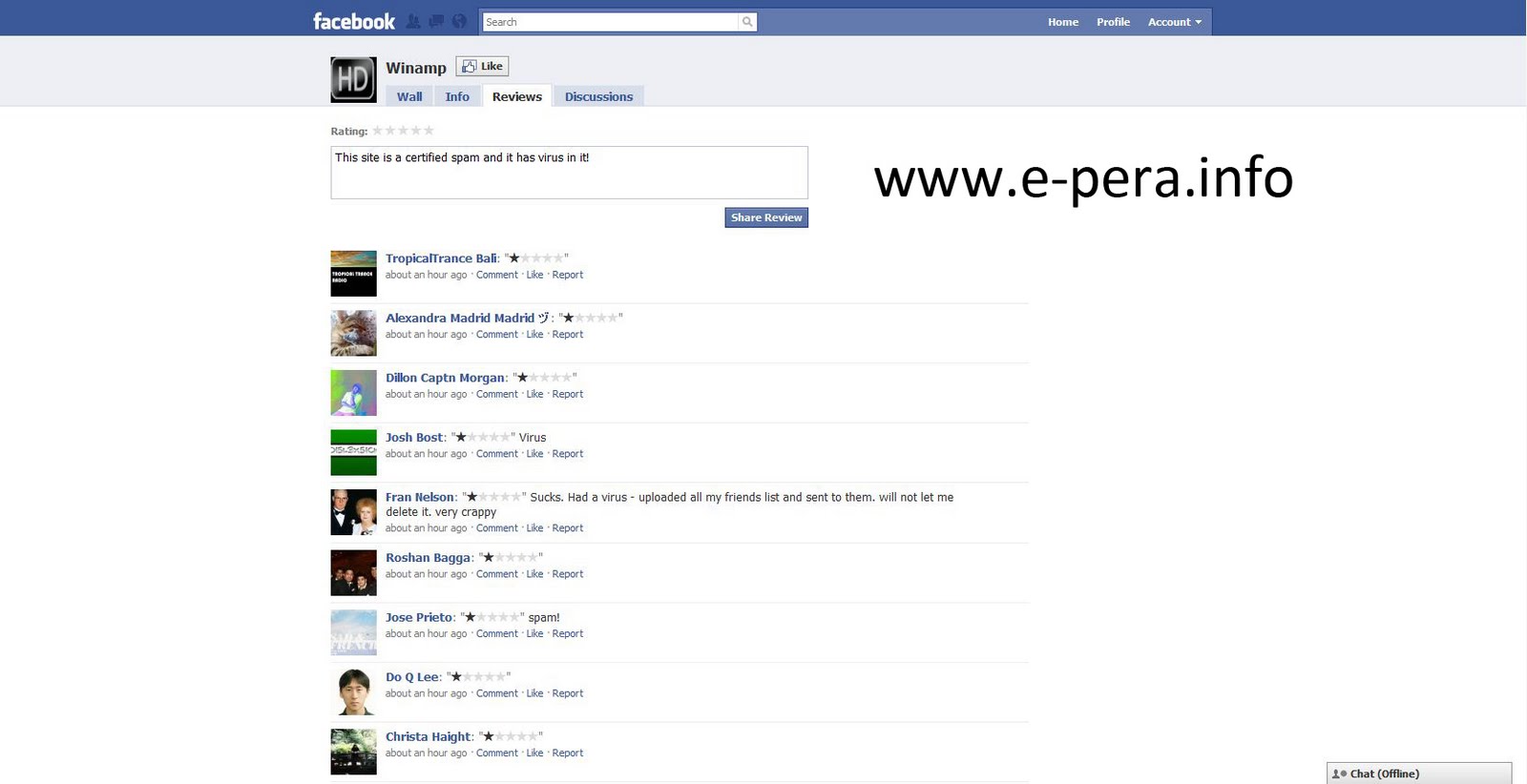
Don't forget to take time to write a review about your experience or thoughts about that application on why you blocked them to help other facebook users know more about it. Just click the "Reviews" tab and compose your review.

Block Facebook Application Step 7

Note:
I've also learned that some applications just get reapplied, so it's best to check your facebook wall from time to time for unwanted posts and just block them again to keep your wall clean and spam free.

| 1 comments ]


I've seen the worst account management in NeoBux history.
We're have I seen it? Everywhere.

So, either you like it or not, I'm here to teach you about account management.
In this first class, we'll be learning how to recycle.

So, grab a seat, a mug of coffee and read on...

Recycle: This is the most powerful tool you can have to enhance your earnings.
It's so powerful that is being completely misused.

Let's start with the story behind the recycling process...
Whenever you recycle a referral, you get a new one. No surprises here.
The referral that got fired, isn't tossed to the lions. After 15 days of being recycled, if his/her activity is back on the general rule of 10 clicks in 5 days, that user goes back to the rental distribution and can be rented or exchanged by another user again.
My in-depth analysis shows that 61% of the recycled referrals are indeed good users after those 15 days (I don't count the solitary days).
This clearly shows that many users are being recycled like crazy.

There are many types of people in this world and yes, like in Noah's Ark, we have a couple of each species.

There are the excellent clickers: A good and hard-working user who religiously never misses a day of clicking. These are hard to find, especially when they have no referrals to work for.

There are the once-upon-a-time clickers: We can easily divide these in two groups: The ones that click every other day (either because they click twice in a day or because they share an account) and the ones that click half (or about) the minimum advertisements available (also account sharing takes place as many daily normal activities people have with friends and family).

There are the never-never clickers: These are the funny ones. They register but either never login or login but never click. These mostly come from referral's exchange and are here just to look at the funny pretty colors.

There are click-and-got-tired clickers: These ones click on the first day(s) and then, all of the sudden, they get tired. Usually, it's not a wrist strain or a non working mouse but the deception of seeing only 1 cent per click. Daddy always gives them more as an allowance.

There are the I-got-my-wife/mother-in-law/dog/boss on my back ones: These are the folks you see in the street rushing to work in the morning and getting home late at night. They do try to click but fail sometimes because there's something else more important to do.

There are the crazy ones: These are classified as miscellaneous behavior individuals... you never know what they'll do next.

So, after this mini classification, you'll see that everyone has their own life and ambitions.
We have hundreds of users daily requesting us to reopen their accounts because they've been suspended because of being inactive for more than 30 days. Besides the usual hospitalization justification, the second one is always "I got scammed in PTC nr 195782 or in PTC nr 840932.
This means that a bad clicker or inactive user can become an excellent one or, sometimes, it's just the other way around.

This leads me to the account management itself.
Most users recycle referrals as they were part of the same religion or soccer team. Trust me, they're not!
There is no "this works for everyone" strategy. No universal solution for the good management mystery. But, there is something that you can do in your account that you do each day in numerous situations in your life: judge!
You take a walk down the street and you see people, right? Either you like it or not, you judge them. But, until you know them, you judge them based on pre-defined ideals. You separate them by sex, weight, hair color, etc. How many times have you classified someone as bad and got to be their friend and enjoy their company?
Referrals are people too... and most of you keep making the same mistakes over and over again as you do in real life.
Get to know your referrals better. Try to imagine each one as a person and analyze their clicking behavior. This will lead you to understand if they're just playing around or really want to be good users but can't.
One by one is a hard task for those who many referrals... I never said it would be easy.
Like being a boss of a 3 people company is way easier than being a boss for a multinational factory with thousands of workers. The more you have, the more you have to work.

And now, let's take a quick look at the free recycle.
It's good, right? Free is always nice.
But, here free can cost you... a lot! Many users use this free recycling as a way of saving but, most of them are not saving but losing in the end.
It's very simple. You rent a referral for $0.20 (example). This means that for 14 days, this referral cost you around $0.10, correct?
So, are you letting him be paid for doing nothing for 14 days and get a new one for free or are you going to recycle him/her?
In the first option, while you don't pay a thing to have that referral recycled, you've lost $0.10.
If you've recycled him/her in the first place, you'd only lose $0.08 and would have 14 days where most likely the new user would have clicked some advertisements thus making you earn.
See the difference? Think about it.

Please, don't stare and drool at other users statistics.
You're as good as they are.
You have the tools and you need to use them.
Referrals are real persons... active, lazy, caffeine addicted and sometimes ugly.
So, waste a little more time. You'll be working towards a better goal: your profit.

Hope these tips will enlighten you on how to optimize your management.
Happy earnings!

(source: Neobux Forum)


Don't get left behind!
Subscribe to my blog for my upcoming posts.. . . . . . . . . . .
Subscribe to E-Pera by Email

| 2 comments ]


Pa'no ba mag register sa MixBux?
Click the link below:
MAG REGISTER

Mapupunta ka sa Mix Bux Homepage.
Click "Register"

Mapupunta ka sa Registration Form ng Mix Bux.
Fill up the form.
IMPORTANT: Make sure na nakalagay ang name ko as "Referrer" (bogcess).
If not, kindly put it manually. Thanks!
Pag tapos ka na, click the "Register Account" button.

Congratulations!
May Mix Bux Account ka na!

Pwede ka ng mag login!
Enjoy!


Subscribe to my blog for my upcoming posts.
Subscribe to E-Pera by Email

| 0 comments ]


Pa'no ba mag register sa BuxFox?

Click the link below:
MAG REGISTER NA!

Mapupunta ka sa BuxFox Homepage.
Click "Register"

Fill up the form.

Note: Make sure na ako ang iyong referrer (bogcess)
Kung sakaling hindi nakalagay ang name ko, kindly put it manually.
Thanks!
Read the Terms of Service (TOS) then check the box after reading it.
Copy the code.
When you're done, click the "Register" button.

Congratulations!
Registered ka na!

Pwede ka ng mag login!
Enjoy!


Subscribe to my blog for my upcoming posts.
Subscribe to E-Pera by Email

| 2 comments ]


Pa'no ba mag register sa AtBux?
Click the link below:
MAGREGISTER NA!

Mapupunta ka sa AtBux Homepage.
Click mo yung "Register"

Mapupunta ka sa AtBux Registration Page.
Fill up the form.

IMPORTANT: Make sure na nakalagay ang name ko (bogcess) as referrer.
If not, kindly put it manually. Thanks!
Read the Terms of Service (TOS)
Check the box confirming na sumasangayon ka sa rules nila.

Copy the security code.
Click the "Register" button.

Registered ka na!

Pwede ka ng mag login!
Enjoy!


Subscribe to my blog for my upcoming posts.
Subscribe to E-Pera by Email

| 0 comments ]


Pa'no ba mag register sa Blu Clicks?

Click the link below:
MAG REGISTER NA!

Mapupunta ka sa Homepage ng BluClicks.
Click "Register"

Mapupunta ka sa Registration Page ng BluClicks.
Fill up the form.
Pag tapos ka na mag fill up, click mo yung "Register" button.
Note: Pag click mo ng "Register" button, mag sesend ng e-mail ang BluClicks para sa iyong account validation.

Mapupunta ka sa "Account Activation" page ng BluClicks.
Para makuha ang iyong "Activation Code", mag open ng new tab or window at i-check ang iyong e-mail kung nakapag send na ang BluClicks ng iyong Activation Code.

Kapag na-access mo na ang iyong e-mail, makakakita ka ng message galing sa BluClicks na similar sa ganito:

Click the link para ma-activate mo ang iyong account.
Mag-oopen ito ng new tab or window, at automatic na malalagay ang iyong username at activation code.
All you need to do is click the "Activate" button.
Click it.

Congratulations!
Registered ka na sa BluClicks!

Pwede ka na mag login.
Enjoy!


Subscribe to my blog for my upcoming posts.
Subscribe to E-Pera by Email

| 0 comments ]

Pa'no ba mag register sa Chill Bux?

Click the link below:
MAG REGISTER NA!

Mapupunta ka sa Homepage ng Chill Bux.
Click the "REGISTER" button.

Mapupunta ka sa Registration Form page.
Fill up the required details.

Pag naka fill up ka na, click mo yung "Create Account" button.

Congratulations!
Registered ka na sa Chill Bux!
Pwede ka ng mag login.

Enjoy!


Subscribe to my blog for my upcoming posts.
Subscribe to E-Pera by Email

| 0 comments ]

Pa'no ba kumita sa DUALBUX?

Mag login sa DualBux.

Click mo yung "View Ads"

Mapupunta ka sa Ads Section ng DualBux.
Click mo yung 1st link para makapag view ka na ng ad.
Take note: when viewing advertisements, dapat paisa-isa at huwag sabay-sabay.
Bawal sa PTC ang sabay-sabay na pag view ng ads.

Pag click mo ng 1st link, may mag oopen na new tab or new window containing the advertisement.
Kung mapapansin mo, mayroong loading bar na nasa itaas ng iyong screen.
Antayin mo itong matapos upang ma-validate ang iyong click.

Pag natapos na itong mag-load, may mga numbers kang makikita.
Just match the picture with the right code and click it.

Pag tama ang napili mong code, mavavalidate ito ng DualBux at makikita mo ang "Checkmark" confirming ang click mo. Pwede mo na i-close ito para makapag view pa ng ibang ads.

Pag balik mo sa "View Ads" page, click mo na yung 2nd ad and gawin mo yung same process na ginawa mo sa 1st ad.
Pag natapos mo na yung 2nd ad, click mo na yung susunod.
Hanggang sa matapos mo lahat ng advertisements.

Pag naclick mo na lahat ng advertisements, pwede ka ng mag logout.
You can click again tomorrow.

That's earning money, DUAL BUX Style!
Click everyday!


Subscribe to my blog for my upcoming posts.
Subscribe to E-Pera by Email

Previous home